Spiga

BlueBug

BlueBug-Bluetooth Loophole
BlueBug is the name of a bluetooth security loophole on some bluetooth-enabled cell phones.This loophole can be used to attack a bluetooth enabled mobile and the attacker can send messages,download phone books and call list and many more things.

Phone Calls

As mentioned above, the BlueBug security loophole allows the attacker to initiate phone calls from the victim's device. Things that can be done with initiating phone calls include:

  • eavesdropping
    when the victim passes, a phone that is owned by the attacker (e.g. an anonimously used prepaid-card phone) is called. From this moment on, the attacker is able to listen to all the conversations that the victim does until the victim hangs up the phone
  • causing financial damage
    since phone calls to any number can be established, it is also possible to call premium service numbers from the victim's device. If the victim does not realize that a phone call is connected to a premium service number, this would cause severe financial damage to the victim.

SMS

Sending SMS from the victim's device can be used for quite a lot of things:

  • finding out the victim's phone number
    The phone number of the respective device is not storedd at a predefined location. The devive's number can be gained by sending an SMS from the victim's device to a phone that is owned by the attacker.
  • causing financial damage
    There are quite a lot of SMS-based services that cost the client about 3 Euros per SMS. Usually, these services are used to sell ringtones and logos. There are also news subscriptions that can be ordered by SMS that continously cause costs to the victim.
  • tracking the victim
    As a location-based service, some providers allow other users to locate their customers by the GSM global cell id which their phone is connected to. According to the the mode the respective GSM cells are configured, this information can be very detailed. In order to do this, the provider must get the permission from the customer. This permission is usually given via SMS (which is sent by the attacker).
  • revealing secrets
    Often SMS messages are used to silently communicate secret information with other people. Reading SMS of the attacked device is often touching the victim's privacy. Paparazzi could use this attack in order to find out more about certain celebrities.

BlueBug example
#scan for bluetooth devices:
oscar@darkside $ hcitool scan
Scanning...
00:0E:6D:10:1D:B6 Nokia 6310i
00:05:7A:01:A3:80 Airbus A380
00:06:6E:21:69:C2 Bluespoon AX
00:0F:DE:6C:61:04 T610
#bind channel 17 of target device to /dev/rfcomm42:
oscar@darkside $ rfcomm bind 42 00:0E:6D:10:1D:B6 17
#connect to AT terminal via, for example, cu:
oscar@darkside $ cu -l /dev/rfcomm42
Connected.
AT+CPBS="ME"
OK
AT+CPBR=1
+CPBR:1,"",,"ParisHilton"
OK
~.
Disconnected.
Linux Basics

Unused Linux Basics

Shellscript File Tests

if [ -e $file ]; then
./myUtil $file
fi

TEST MEANING
[ -b $file ] True if file exists and is block special.
[ -c $file ] True if file exists and is character special.
[ -d $file ] True if file exists and is a directory.
[ -e $file ] True if file exists.
[ -f $file ] True if file exists and is a regular file.
[ -g $file ] True if file exists and is set-group-id.
[ -k $file ] True if file has its ``sticky'' bit set.
[ -L $file ] True if file exists and is a symbolic link.
[ -p $file ] True if file exists and is a named pipe.
[ -r $file ] True if file exists and is readable.
[ -s $file ] True if file exists and has a size greater than zero.
[ -S $file ] True if file exists and is a socket.
[ -t $fd ] True if fd is opened on a terminal.
[ -u $file ] True if file exists and its set-user-id bit is set.
[ -w $file ] True if file exists and is writable.
[ -x $file ] True if file exists and is executable.
[ -O $file ] True if file exists and is owned by the effective user id.
[ -G $file ] True if file exists and is owned by the effective group id.

Directory Size Lister/Sorter
du -sm $(find $1 -type d -maxdepth 1 -xdev) | sort -g

style="font-weight: bold;">Finding Who Has a File Open

[slitt@mydesk slitt]$ /sbin/fuser -mu /d
/d: 1693(slitt) 1891c(slitt) 1894 1894c(slitt)
1907 1907c(slitt) 1908 1908c(slitt) 1909 1909c(slitt)
1910 1910c(slitt) 1912 1912c(slitt) 1913 1913c(slitt)
[slitt@mydesk slitt]$

Hack Any Computer With Windows

Hack Computer Without Deleting Old Password


- Funny bloopers R us

Where Internet Explorer Store Password

Where Internet Explorer Store Password

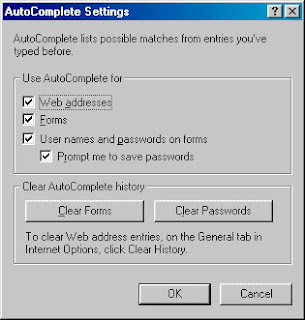
Internet Explorer store the username and password on user's choice for the user's convinient.It very useful for us.But for one or many reason ,sometimes we need to remove the stored password.Deleting the history,cookies doesn't clear the password.To delete the password,go to 'Internet Option','content', and 'AutoComplete' tab.

Click on 'Clear Password' to remove the the stored password.

Enjoy.....

Password Protection Using .htaccess File

Password Protection Using .htaccess File:.htpasswd

We can use the .htaccess file as a password protection.To do this we need to add few lines in the .htaccess file.Add the following below lines in the file.


1)Replace "Section Name" with the name of the part of the site you are protecting.
2)Change
/full/parth/to/.htpasswd to the full server path to the .htpasswd file.

Now write the file .htpasswd.To do this make a text file and write and save it as .htpasswd.Store this file
anywhere within the website (as the passwords are encrypted) but it is advisable to store it outside the web root so that it is impossible to access it from the web.

Once you have created your .htpasswd file (you can do this in a standard text editor) you must enter the usernames and passwords to access the site. They should be entered as follows:

username:password


The
password must be in encrypted form.For this do this:

1)To create the .htpasswd file, use the htpasswd command with the following format:
htpasswd [-c] .htpasswd {username}

After executing this command password,you will be asked to enter the password and it will store the password in the file.
Thats all the file is ready and you are ready to implement the file.

.htaccess file-2

How to write .hatccess file

In the previous article .htaccess file we came to know how the .hataccess file works.In this article we will try to create a simple .htaccess file.The simple .hatccess file look like this:


Creating a .htaccess file may cause you a few problems. Writing the file is easy, you just need enterthe appropriate code into a text editor (like notepad). You may run into problems with saving the file.Because .htaccess is a strange file name (the file actually has no name but a 8 letter file extension)it may not be accepted on certain systems (e.g. Windows 3.1). Though, all you need to do is to save the file by entering the name as:
.htaccess

To ban the ip address we do the following:

SetEnvIf Remote_Addr ^A\.B\.C\.D$ banit
SetEnvIf Request_URI "^(/403\.html¦/robots\.txt)$"
allowit

The first line ban the ip address A.B.C.D and the second line allow the 403.html error page to open.

In the next article of .htaccess file we will look into password security and the file relation.