Spiga

Showing posts with label Internet explorer. Show all posts

How To Bookmark WebPage In Browser

How To Bookmark WebPage In Browser


This is quite simple but always we forgot to do this. In this post we will recall how to add the webpage to the bookmark or to add to favourites. By doing this, we save the link of the webpage for future reference. Here are the steps to do this:


1) Go to the page you want to bookmark/add to your favourites.
2) Click Favorites in the top menu bar then Add to Favorites.

Also you can use the Ctrl+D button to bring the pop up in front.

3)The Add Favorite dialogue box appears. The title from the web page will be in the name box. Click the Create In button
4) You can click OK button or can customize as per requirement.

See Cricket live score in Office

See Cricket live score in Office:

Unable to open the cricinfo.com to view the live scorecard. Try the following links:

http://scores.sify.com/index.shtml
http://in.wap.yahoo.com/p/cricket-india/LiveScore?match=1

Even these sites are not opening then try igoogle.
Still u r not able to view the score then only option is to try search cricket online/live score on google.

Enable Page Rank Button In IE8

Enable Page Rank Button In IE8

To add page rank button in your explorer, you need to install the toolbar,google toolbar is the best one.
If you installed new Internet Explorer 8 or upgraded to IE8 from IE7,Google toolbar does not came enabled by default with pagerank button.But we can manually enable PageRank button for Google Toolbar very easily.
Enabling PageRank button for Google Toolbar in Internet Explorer

1. Click the Wrench icon on the Google Toolbar>select Tools>check or enable pagerank and save.

2.You can now see the PageRank button appearing for web pages you visit in Internet Explorer.

Customize Internet Explorer


Customize Internet Explorer


Open Internet Explorer to a Blank Page
  • Create a new Desktop shortcut

  • In the command line, (highlight and paste the below)
    "C:\Program Files\Internet Explorer\IEXPLORE.EXE" -nohome

  • Name the shortcut: (example) IE Blank
    From now on you can paste a saved URL without loading your ISP software, etc.

  • You can also drag this shortcut into your Quick Launch area.
    Note: this is the same as setting your Home Page to: "about:blank"
    Ad-Aware users, setting your page to "About:Blank" causes a false CWS detection.


  • SendTo Tip

  • Add Internet Explorer to your SendTo folder

  • Start - Run (type) "sendto" (no quotes) File - New - Shortcut (XP only)

  • In the command line, (highlight and paste the below - including quotes)
    "C:\Program Files\Internet Explorer\IEXPLORE.EXE"


  • Note: IE supports opening: .gif, jpg, htm, html, .txt, ico, etc.
    Windows Vista users will need to navigate to the following location:
    Users\\AppData\Roaming\Microsoft\Windows\SendTo
    [or]
    Start | Run (type) shell:sendto (click Ok)
    Right-click in the right pane and select: New > Shortcut
    In the command line, (highlight and paste the below - including quotes)
    "C:\Program Files\Internet Explorer\IEXPLORE.EXE"

    Fast Printing web pages without images
  • Create a one line .css file [example] "NoImages.css", copy the below line to Notepad and Save As: NoImages.css. Open Internet Options | General tab | Accessibility button, place a check in "Format documents using my style sheet", click OK.


  • Code:
    IMG { display: none !important;}


  • The next time you want to print the contents of a web page but don't want to waste the time and ink printing all the ads, banners, etc. just Toggle the above option on\off.


  • Note: there is no need to restart IE as this trick works on the fly.

    Protecting Your Internet Explorer
    Lately there has been a rash of incidents where either a web site or email spam has contained a hidden javascript that changes your Home Page entry, then disables the users ability to change it back. To prevent this from happening ... be one step ahead of these characters. Set your Home Page then disable the ability to change it via a Registry restriction. It is also recommended you use a Startup Monitor. Be aware that in some cases this method does not work as some of these parasites will re-write the registry entries on each restart. However a "Startup Manager" will prompt you if your setting are being changed.

    HKCU_Hide_HomePage.reg (Current User) 
    HKCU_Undo_HomePage.reg (Current User)


    To download: Right-click the above link(s) and select: "Save Target As".
    To use: right-click and select: Merge (to view: open in Notepad)


    Note: this restriction can apply in 2 locations, the Registry checks the HKLM location first, then the HKCU location. The HKLM takes precedence and applies to all users. The HKCU applies to just the "Current User". 
    If your HomePage gets hijacked, you may need to "undo" both locations.
    Note: XP Pro already has the ability to make these changes via the Group Policy Editor. If the HomePage restriction has been applied by an Administrator, "Limited Users" can not make this change. Start | Run (type) gpedit.msc


    Resize your IE Cache size (XP)

    By default IE reserves 10% of your drive space for the Temporary Internet Files. This was fine several years ago but since then the hard drive capacities have increased dramatically. If you happen to have one of these large disks the 10% is truly unnecessary and wasteful.

    • Close all instances of Internet Explorer and Outlook Express
    • Control Panel | Internet Options | General tab
    • Click Settings and move the slider to 50 mb, click Ok
    • Click Delete Files and also select: "Delete all offline files", click Ok
    • Click Clear History, click Ok, Apply/Ok 

    Note: While viewing Newsgroup messages Outlook Express dumps a series of zero-byte files into the browser cache. When Outlook Express is closed it fails to cleanup these files. To delete these zero-byte files you must select the above option  "Delete all offline files".


    TIFF Image Viewer

    AlternaTIFF is a web browser add-on (ActiveX control or plug-in) that displays most of the common types of TIFF files.


    Spell Checker for Internet Explorer

    Editors Note: has an option to integrate the database from other spell checkers.

    Agent Ransack (freeware) File searching software (XP only)
    This is not a replacement to Microsoft's built-in Search Utility, it's just much faster!

    How to remove stored passwords in Internet Explorer

    This summary is not available. Please click here to view the post.

    Where Internet Explorer Store Password

    Where Internet Explorer Store Password

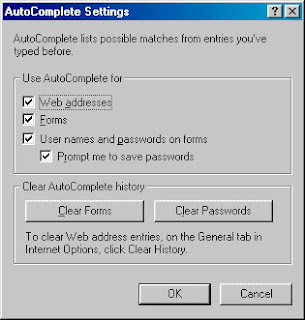
    Internet Explorer store the username and password on user's choice for the user's convinient.It very useful for us.But for one or many reason ,sometimes we need to remove the stored password.Deleting the history,cookies doesn't clear the password.To delete the password,go to 'Internet Option','content', and 'AutoComplete' tab.

    Click on 'Clear Password' to remove the the stored password.

    Enjoy.....

    Critical Attack Slams Microsoft IE 6 and 7


    Attack Throgh IE 6 and 7

    Attackers could hijack your PC if you simply viewed a Web site or read an HTML e-mail laced with a poisoned animated-cursor file (.ani).So,be alert while opening Webpages and reading HTML pages.The flaw can be targeted through browsers, including Internet Explorer (6 and 7) and Firefox, as well as via Outlook versions 2002 SP3 and later, on Windows XP SP2 and Vista systems. Microsoft says that the risk with IE 7 under Vista is mitigated because of IE’s protected mode, and that Outlook 2007 is safe because it uses Word to display HTML e-mail.

    What is surprising is that the Microsoft knew about the hole three months before the attacks began. You can get the patch over Microsoft Automatic Updates or at Microsoft’s website.

    IE 7’s troubles continue with a proof-of-concept phishing exploit published by security researcher Aviv Raff. Using it, an attacker could fool you and IE with an e-mail or Web link to a doctored error page that, when refreshed as directed, would send you to a phishing site disguised as a legitimate destination. The impostor site would show the real site’s URL in the address bar, potentially tricking even careful surfers.
    At press time Microsoft had not yet issued a fix; as always your best bet is never to click an e-mail link to access your bank or other financial account, even if you’re sure that the e-mail is legit. Instead, type in the address yourself or use a bookmark. For more, including a vulnerability test, see the Secunia website.

    Microsoft is shipping another patch batch that improves Vista compatibility for a range of programs, including Trend Micro Internet Security 2007 and Microsoft Money 2006. For the patch and a list of affected apps, see Microsoft’s March 2007 Windows Vista Application Compatibility Update. Expect such fixes to be a regular thing.


    Update for Apple Quick Time Media Player.


    Apple has released yet another update to fix multiple dangerous holes in its QuickTime media player software for both Mac and Windows.The patch closes eight critical vulnerabilities in how the player handles a variety of media files--and annoyingly it will put QuickTime on your desktop and in your system tray whether you want it there or not. An attacker exploiting any of the flaws could hit you with a drive-by download if you visit a rigged site or click on an e-mail link to a poisoned movie, so make sure that you have version 7.1.5 or later. Learn more from Apple’s page on the security content of QuickTime 7.1.5.


    More battery woes


    Lenovo is recalling and replacing 205,000 (100,000 in the United States) lithium ion laptop batteries for ThinkPads sold between November 2003 and February 2005, due to an overheating problem that can occur if the battery is dropped or hit. To find out if your battery is affected, see Lenovo’s battery recall support page.